Your First Step into Hybrid Identity
📘 Introduction
If you’re starting your journey into Microsoft cloud technologies, you will quickly hear about Azure AD Connect.
It’s one of the most important tools for organizations that use Active Directory on-premises and Azure Active Directory (Azure AD) in the cloud.
This beginner-friendly post explains what Azure AD Connect is, why it is used, how it works, and why every organization with Microsoft 365 needs it.
Let’s get started!
🔷 What is Azure AD Connect?
Azure AD Connect is a Microsoft tool that synchronizes your on-premises Active Directory with Azure Active Directory.
It ensures your users have a single identity across:
- On-premise applications
- Azure services
- Microsoft 365 (Exchange Online, Teams, SharePoint, etc.)
✨ In simple words:
It copies your users and their passwords from your local AD to Azure AD so they can sign in to cloud services using the same username and password.
🔷 Why Do We Need Azure AD Connect?
Organizations using Microsoft 365 or Azure want seamless sign-in and one identity for each user.
Azure AD Connect makes that possible by:
1. Syncing On-Prem Users to the Cloud
Users created in your local AD automatically appear in Azure AD.
2. Keeping Passwords in Sync
Users don’t need two passwords.
(Syncs a secure password hash, not the actual password.)
3. Enabling Hybrid Identity
A mix of on-prem and cloud accounts working together.
4. Supporting Cloud Services
Without Azure AD Connect, your users can’t authenticate properly to Microsoft 365.
🔷 How Does Azure AD Connect Work?
Here is a simple diagram:
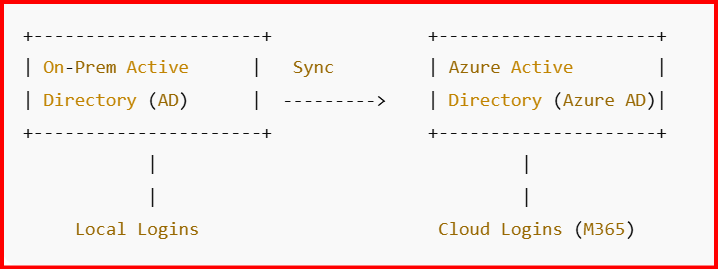
It runs a sync cycle every 30 minutes and updates Azure AD with any new or changed users, groups, or attributes.
🔷 Key Features of Azure AD Connect
🔹 1. User Synchronization
Copies users, groups, and contacts to Azure AD.
🔹 2. Password Hash Synchronization (PHS)
Syncs password hashes → users sign in with the same password.
🔹 3. Device Synchronization
Supports hybrid Azure AD join.
🔹 4. Seamless Single Sign-On
Users inside your network can sign in automatically.
🔹 5. Health Monitoring
You can check synchronization status using Azure AD Connect Health.
🔷 Who Uses Azure AD Connect?
Azure AD Connect is used by:
- Companies with on-prem Active Directory
- Organizations moving to Microsoft 365
- Hybrid cloud environments
- IT admins managing identity and access
If a business uses both local AD and Microsoft 365, Azure AD Connect is almost always required.
🔷 Benefits of Azure AD Connect
✔ Consistent identity (one username + password)
✔ No need to recreate users in the cloud
✔ Easy access to Microsoft 365
✔ Reduced helpdesk calls (“I forgot my password”)
✔ Better security and compliance
🔷 Simple Example for Beginners
Without Azure AD Connect:
- A user has a local AD account
- They must create a separate Microsoft 365 account
- They must remember two passwords
With Azure AD Connect:
- Create user once in Active Directory
- User automatically appears in Microsoft 365
- One password works everywhere
- IT management becomes much easier
🔷 Is Azure AD Connect Hard to Learn?
Not at all!
For beginners:
- Installation is wizard-based
- Express setup works for most small environments
- You don’t need deep AD knowledge to start
This makes it a perfect first topic for your blog.
🎉 Conclusion
Azure AD Connect is the bridge that connects your on-premises Active Directory to the Microsoft cloud. It provides identity synchronization, password sync, and an easy sign-in experience for users.
If you plan to learn Microsoft 365, Azure, or cloud identity technologies, Azure AD Connect is the best place to start.
Leave a Reply