-
Part 3: The Guard Towers — Understanding Domain Controllers
In our last two posts, we talked about the “City Hall” (Active Directory) and how we organize the “Neighborhoods” (Domains). But a city is only as safe as the people guarding its gates. In Active Directory, the “Guard Towers” are called Domain Controllers (DCs). These are the physical or virtual servers that do the actual…
-
Part 2: Neighborhoods & Forests — Organizing Your Digital City
In Part 1, we established that Active Directory is the “City Hall” of your business—the central place where all IDs and keys are managed. But what happens when your city grows? What if you open a second branch in another country, or acquire another company? In my meditation practice, I’ve learned that as things grow,…
-
Active Directory 101: Understanding the “City Hall” of Your Network
In the high-pressure world of System Administration, we often get caught up in the latest cloud gadgets and high-level security protocols. But as I’ve learned through over 1,000 hours of meditation, everything needs a center. In the world of IT, that center is Active Directory. Welcome to the first part of my journey through the…
-
⭐ How to Delete an Email After It Has Been Sent in Microsoft 365?
We’ve all been there—you hit Send, and instantly realize you sent the message to the wrong person, forgot an attachment, or noticed a mistake. If you’re using Microsoft 365 (Outlook), there is a way to attempt to “unsend” or recall an email—but there are a few important limitations. This guide explains how to delete or…
-
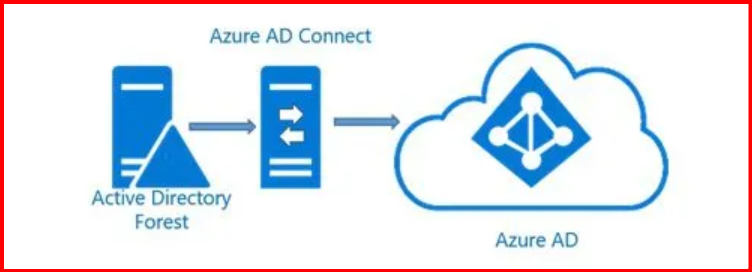
⭐ Installing Azure AD Connect (Step-by-Step Guide for Beginners)
Your First Hybrid Identity Setup Once you understand what Azure AD Connect is and have checked all prerequisites, the next step is to install it. This beginner-friendly guide walks you through the entire installation process, from downloading the tool to verifying your first sync. Let’s begin! 🔷 Step 1: Download Azure AD Connect You can…
-
⭐ Prerequisites Before Installing Azure AD Connect
A Simple Guide for Beginners Before you install Azure AD Connect, you must make sure that your environment meets the basic requirements. This ensures a smooth installation and prevents sync failures later. Below are the essential prerequisites every beginner should know. 🔷 1. Active Directory Requirements (On-Prem Domain) Azure AD Connect requires a healthy on-premises…
-
⭐ What is Azure AD Connect? – A Beginner-Friendly Introduction
Your First Step into Hybrid Identity 📘 Introduction If you’re starting your journey into Microsoft cloud technologies, you will quickly hear about Azure AD Connect.It’s one of the most important tools for organizations that use Active Directory on-premises and Azure Active Directory (Azure AD) in the cloud. This beginner-friendly post explains what Azure AD Connect…
-
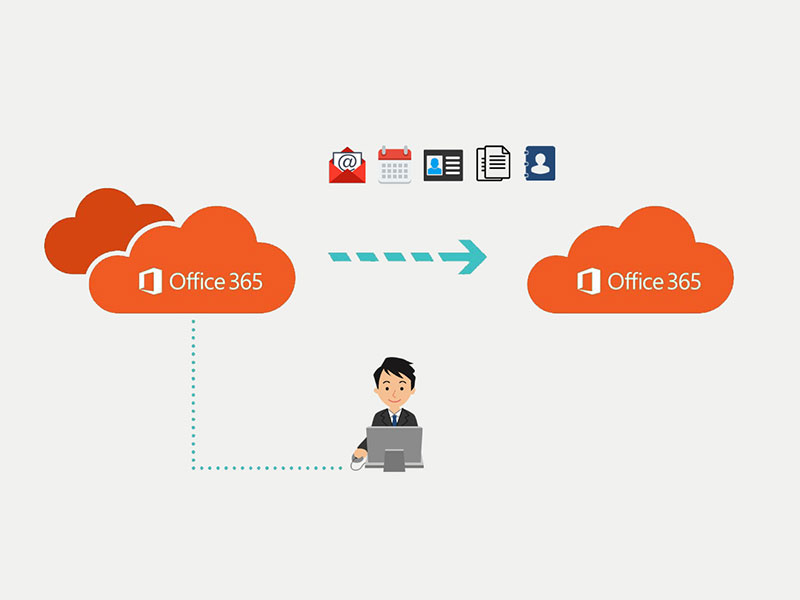
Microsoft 365 Cross-Tenant Mailbox Migration – Technical Guide
Migrating mailboxes across Microsoft 365 tenants can be complex but manageable with proper planning, tools, and execution. This guide covers everything IT admins need, including scripts, mapping examples, and troubleshooting tips. Considerations Step 1: Consider the Prerequisites Before beginning, you need to obtain the tenant IDs for both the source and target tenants. To do…
-
Step-by-Step Guide to Microsoft 365 Cross-Tenant Migration – Part1
Cross-Tenant Migration Cross-tenant migration is the process of migrating workloads from one Microsoft 365 tenancy to another. This process can involve the migration of one or many workloads (including Exchange Online, SharePoint, and OneDrive). Migrating mailboxes between Microsoft 365 tenants is a critical task for organizations undergoing mergers, acquisitions, divestitures, or tenant restructuring. Proper planning…